Phantom Banks Phantom Banks Video
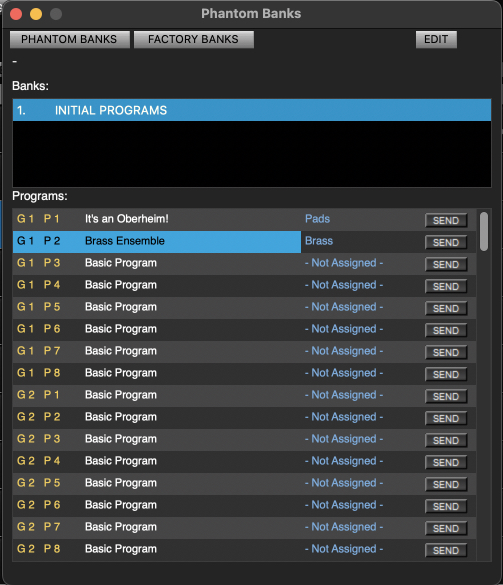
Phantom banks provide an additional storage space for a virtually unlimited number
of programs and banks. These banks and programs will be available at any time.
You can also recall Factory banks from this window if you need to restore a specific
program or full bank.
Phantom Bank Menus
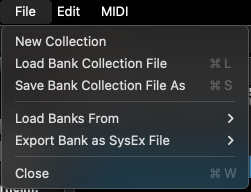
File
New Collection - Create a new blank bank to collect programs in. You can rename the
bank by double clicking the title.
Load and Save Collection File - Manage Phantom Bank collections saved to disk.
Load Bank From - You can load previously saved standard OB-X8 bank files into a Phantom
Bank.
Export Bank as SysEx file - A Phantom bank can be saved as a sysex file if required.
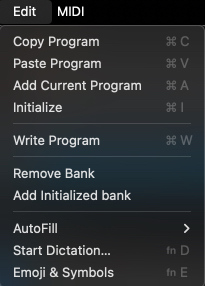
Edit
Copy and Paste Program - Copy a program in a Phantom bank and Paste to a different
location.
Add Current Program - adds the current program on the OB-X8 to the Phantom Bank
Initialize - Initializes the currently selected Phantom Bank program.
Write Program - Writes the currently selected program to the OB-X8.
Remove Bank - Removes the currently selected bank
Add Initialized Bank - Add a new bank with all initialized program slots.
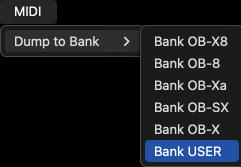
Midi
Dump to Bank - Transmit the current bank to the OB-X8. This will overwrite the selected
bank in the synth.